

🤖 Template #21593: Sanitize & Ingest AI LLM JSON into Postgres with DevDeskApp and Slack
🔗 Template on n8n.io: n8n.io/workflows/21593
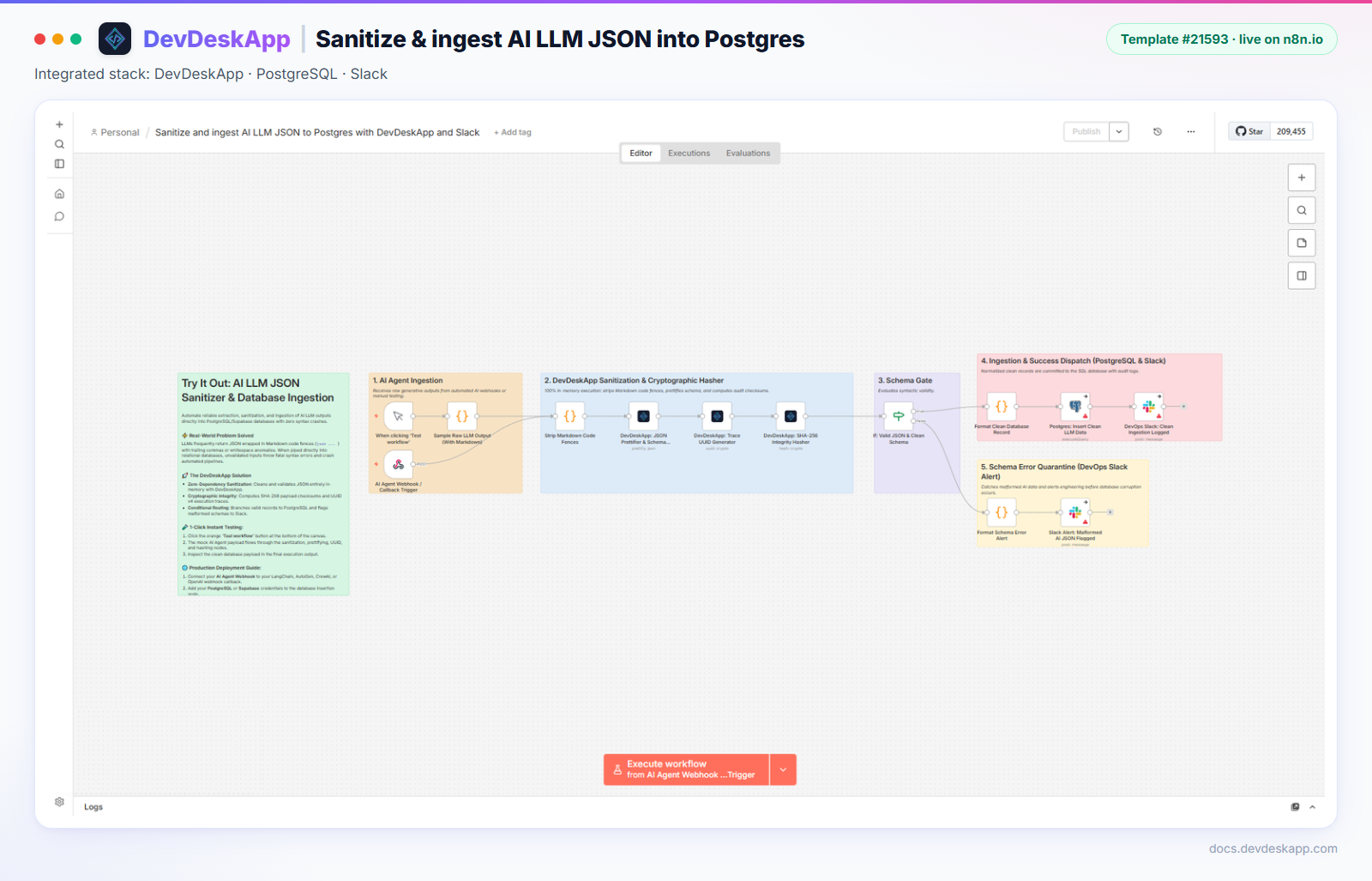
🎯 Overview
LLMs often wrap JSON in markdown fences (```json … ```), which breaks JSON.parse and SQL inserts. This template is an ingestion gateway for model output:
- A Code node strips the markdown fences from
rawResponse. - The DevDeskApp JSON Prettifier parses and formats the cleaned string. Invalid JSON stops here with a clear error.
- DevDeskApp UUID adds a trace ID that links the database row, logs and Slack.
- DevDeskApp SHA-256 fingerprints the formatted JSON for deduplication and audit.
- An If node sends valid records to PostgreSQL plus a Slack log, and malformed ones to a Slack alert.
Known issue in the published version (checked 4 Nov 2026)
Running the published template end to end shows three problems. Fix them after import:
- Sample node fails to run.
Sample Raw LLM Output (With Markdown)writes the response with four backticks (````), which is a JavaScript syntax error. Change it to a normal string, for examplerawResponse: "```json\n{ ... }\n```". - The hash covers an empty string.
SHA-256 Integrity Hasherreads{{ $json.prettified }}, but the prettifier outputsformatted, and the previous node is the UUID generator. Use{{ $('DevDeskApp: JSON Prettifier & Schema Validator').item.json.formatted }}. - The Postgres branch crashes.
Format Clean Database RecordcallsJSON.parse(prettified.prettified). Change bothprettified.prettifiedtoprettified.formatted.
With these three changes the workflow runs through to the Postgres insert and Slack log.
📸 Pipeline
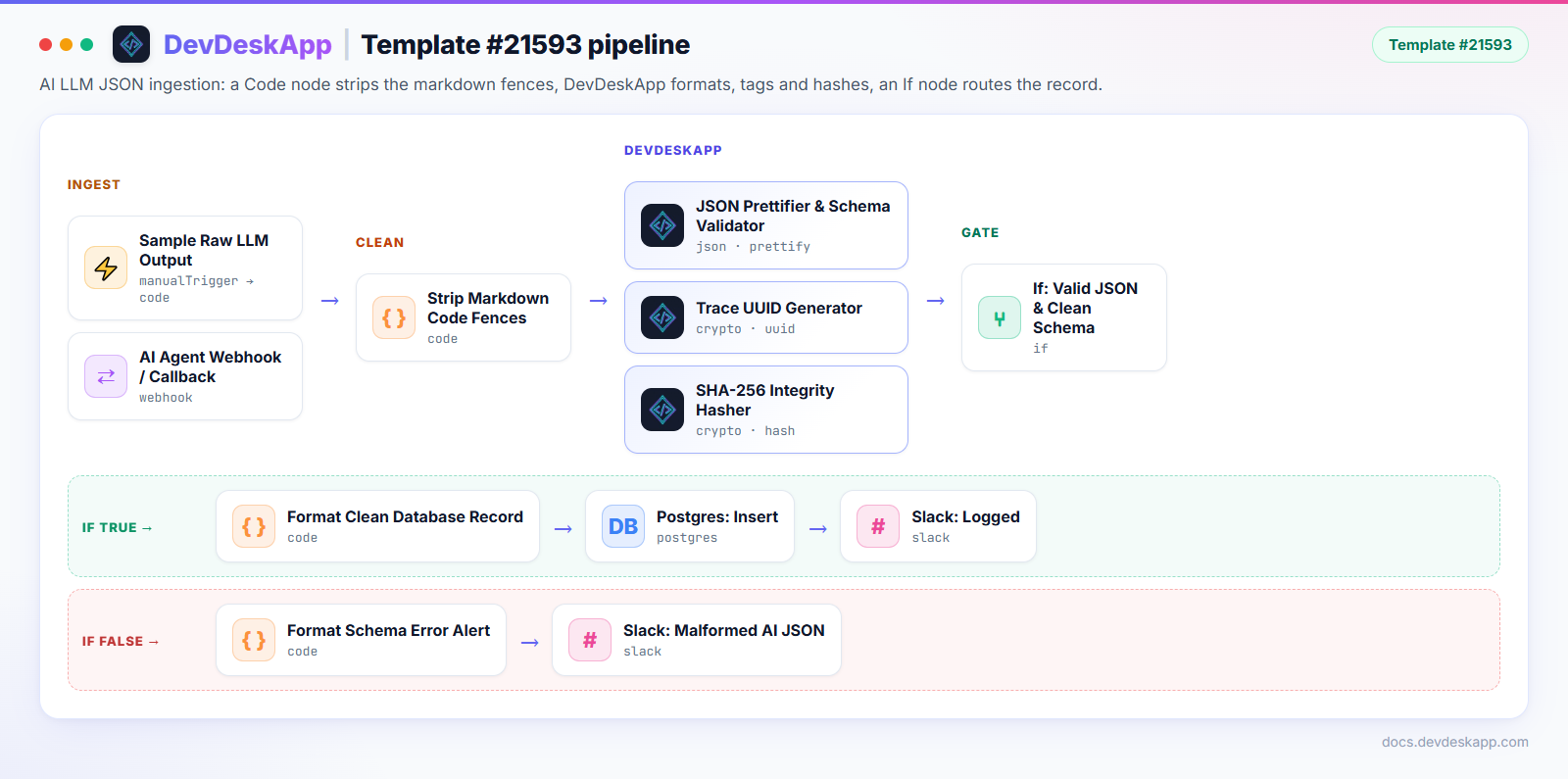
| Node | Resource · Operation | Purpose |
|---|---|---|
| Strip Markdown Code Fences | Code node | Removes leading ```json and trailing ``` |
| DevDeskApp: JSON Prettifier & Schema Validator | json · prettify | Parses and formats cleanedJsonString. Throws on invalid JSON. |
| DevDeskApp: Trace UUID Generator | crypto · uuid | Trace ID |
| DevDeskApp: SHA-256 Integrity Hasher | crypto · hash (sha256) | Fingerprint of the formatted JSON |
| If: Valid JSON & Clean Schema | if | Routes to Postgres or to the error alert |
The DevDeskApp node does not remove markdown fences itself. That is the Code node's job, and the node then parses and formats the result.
⚡ Execution sample (with the fixes above)
Input (rawResponse from the sample node):
```json
{
  "customer_id": "cust_88291",
  "sentiment": "positive",
  "confidence_score": 0.94,
  "intent": "upsell_enterprise",
  "extracted_topics": ["security_compliance", "sso", "audit_logs"],
  "action_required": true
}
```
Output of Format Clean Database Record:
{
  "traceId": "110ae286-1a41-46ec-9142-ec2a2b8f22c5",
  "sha256Checksum": "07df809dca91e8094d9a16a331dd03b97e1aea4ce54b8166bd1a15fa446d9d59",
  "model": "gpt-4o",
  "parsedData": {
    "customer_id": "cust_88291",
    "sentiment": "positive",
    "confidence_score": 0.94,
    "intent": "upsell_enterprise",
    "extracted_topics": ["security_compliance", "sso", "audit_logs"],
    "action_required": true
  },
  "sqlInsertQuery": "INSERT INTO ai_agent_records (trace_id, model, payload, checksum) VALUES (...)"
}
Use query parameters in production
The sample builds sqlInsertQuery by string concatenation. For real data, use the Postgres node's Insert operation or query parameters instead of running that string.
📥 Import it
- Make sure
n8n-nodes-devdeskappis installed (installation guide). - Open the template on n8n.io and click Use for free, or copy the workflow JSON.
- Paste it onto a new workflow canvas with
Ctrl + V(Cmd + Von macOS). - Apply the three fixes from the known-issue box above.
- Add your PostgreSQL and Slack credentials, create the
ai_agent_recordstable, and click Test workflow.