

🤖 AI Agents & LLM Function Calling
Learn how to connect DevDeskApp to n8n AI Agents, LangChain, and LLMs (OpenAI, Anthropic Claude, Google Gemini, Ollama) as a high-performance in-memory deterministic tool suite.
🌟 Why AI Agents Need In-Memory Tools
Large Language Models (LLMs) are phenomenal at natural language comprehension, reasoning, and synthesis. However, when deployed inside production workflow automations, LLMs suffer from three critical bottlenecks:
- Arithmetic Hallucinations: LLMs struggle with precision financial math (Indian Tax slabs, PF, take-home salaries, compound CTC calculations).
- Context Window Token Bloat: Raw webhook payloads inject redundant whitespace and metadata, inflating token costs and slowing inference speeds.
- Data Privacy & Secret Leaks: Passing unmasked webhook secrets, HR salaries, or cryptographic seeds to external LLM cloud APIs violates enterprise security compliance (GDPR, SOC2, HIPAA).
DevDeskApp solves all three bottlenecks
By plugging DevDeskApp directly into the Tool port of an n8n AI Agent node, calculations, formatting, and hashing occur entirely in local Node.js memory in < 0.2ms with zero external network calls.
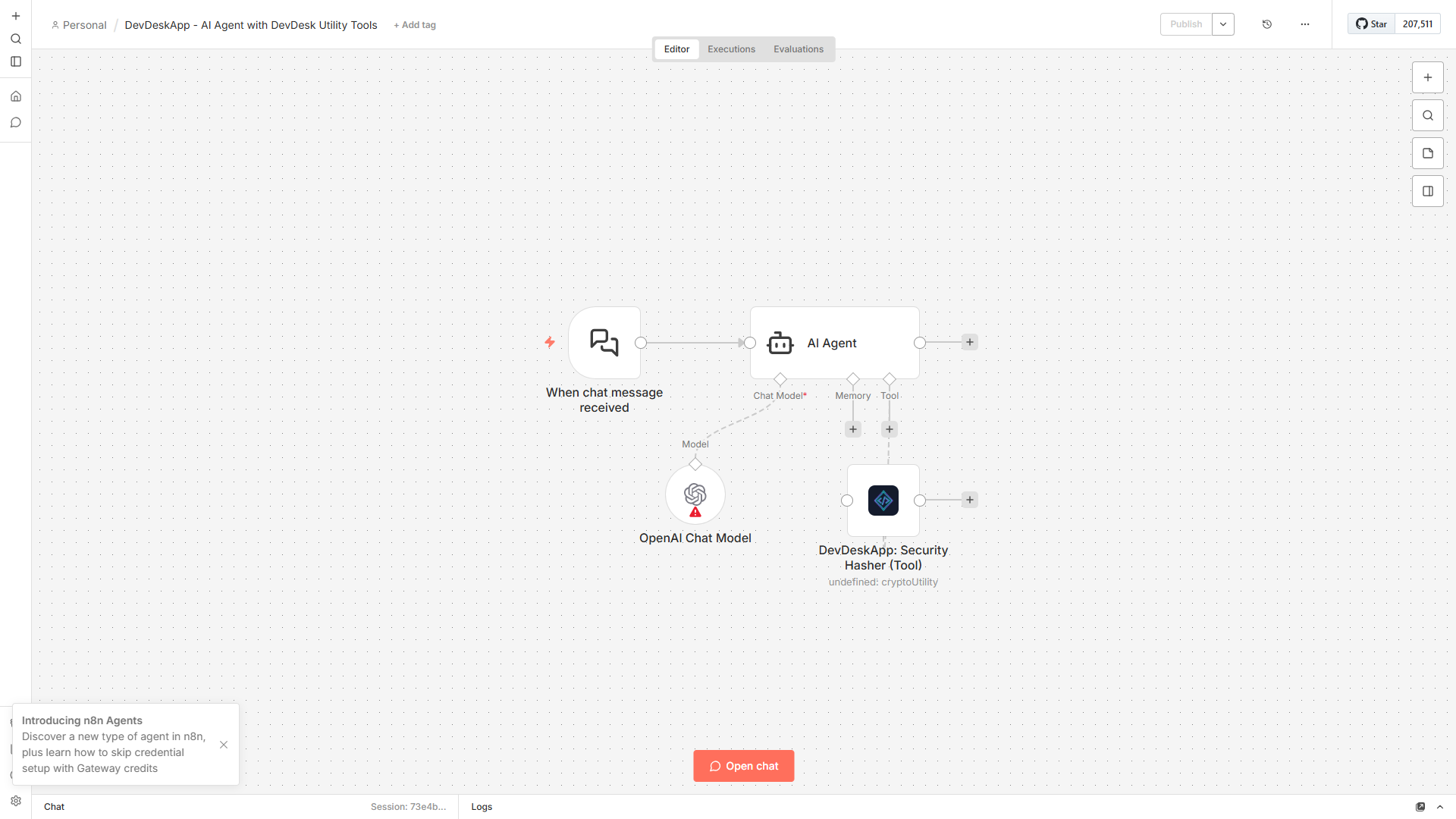
📸 Architecture: AI Agent with DevDeskApp Tool
Below is a live n8n visual automation workflow showing an AI Agent powered by an OpenAI Chat Model delegating security operations to the DevDeskApp Hasher Tool:
🎯 3 Primary AI Agent Use Cases
1. 🧮 Deterministic Financial Calculations (CTC & Indian Payroll)
LLMs frequently hallucinate tax exemptions, basic salary percentages, and employer PF contributions.
- How it works: When a user prompts the AI Agent:
"Calculate the monthly take-home salary and employee PF for a ₹24,00,000 CTC under the New Tax Regime." - Agent Action: Instead of calculating math internally, the AI Agent invokes the
devdeskapp.ctcCalculatortool. - Result: Exactly ₹1,45,000 take-home and ₹12,000 PF returned deterministically in 0.18ms.
{
  "monthlyGross": 200000,
  "basicMonthly": 100000,
  "employeePf": 12000,
  "employerPf": 12000,
  "takeHomeInHand": 145000,
  "professionalTax": 200,
  "regime": "new"
}
2. 🧹 Context Window Compression (JSON Cleaning)
Enterprise webhooks from Stripe, Shopify, or Salesforce can easily reach 10,000+ characters of unformatted JSON, consuming valuable LLM context window tokens.
- How it works: Before piping incoming webhooks into the AI Agent prompt, pass the payload through
devdeskapp.jsonPrettifier(minify mode) ordevdeskapp.slugGenerator. - Result: Strips unwanted whitespace, standardizes keys, and trims context tokens by up to 60%, significantly lowering LLM API bills.
3. 🔐 Zero-Leak Cryptographic Hashing (SHA-256)
Protect sensitive corporate credentials before feeding context to third-party LLMs.
- How it works: Hash passwords, API verification tokens, and user IDs locally into SHA-256 hexadecimal digests.
- Result: The AI Agent only ever sees the tamper-proof cryptographic fingerprint, preventing credentials from entering external LLM training loops or server logs.
⚙️ Step-by-Step Setup in n8n
Step 1: Add the AI Agent Node
- On your n8n workflow canvas, click + and add an AI Agent node.
- Set Prompt Type to
Define belowor connect a When chat message received trigger.
Step 2: Connect a Chat Model
- Connect an OpenAI Chat Model (GPT-4o / GPT-4o-mini), Anthropic Chat Model (Claude 3.5 Sonnet), or Ollama node to the
Chat Modelinput port.
Step 3: Connect DevDeskApp as a Custom Tool
- From the node selector, search for DevDeskApp.
- Drag the output into the Tool input port of the AI Agent node.
- Select the desired operation:
Hash Generator(SHA-256, SHA-512, MD5)CTC Calculator(Indian Payroll)JSON Prettifier & MinifierBase64 Encoder / Decoder
- Provide a descriptive Tool Name (e.g.,
DevDeskApp_Payroll_EngineorDevDeskApp_Security_Hasher).
Step 4: System Prompt Configuration
Add the following instruction to your AI Agent's system prompt:
You have access to the DevDeskApp utility tool suite.
Always use DevDeskApp tools for:
- Calculating Indian payroll, salaries, PF, and tax breakdowns.
- Generating SHA-256 or MD5 cryptographic hashes.
- Formatting and validating JSON payloads.
Do NOT attempt to guess financial formulas manually. Always invoke the corresponding DevDeskApp tool.
🤖 Supported AI Models & Frameworks
| Provider | Models Supported | Integration Type | Latency |
|---|---|---|---|
| OpenAI | GPT-4o, GPT-4o-mini, GPT-4 Turbo | Function Calling / Tool Port | < 0.2ms local |
| Anthropic | Claude 3.5 Sonnet, Claude 3 Opus | Tool Calling | < 0.2ms local |
| Gemini 1.5 Pro, Gemini 1.5 Flash | Tool Calling | < 0.2ms local | |
| Ollama | Llama 3.1, Mistral, Qwen 2.5 | Local Agent Tools | < 0.2ms local |
| LangChain | All LangChain agents in n8n | Structured Tool Port | < 0.2ms local |
🚀 Next Steps
- Explore all 10 native tools in the Operations Reference.
- Inspect local Node execution speed vs cloud APIs in Enterprise Architecture.
- Download the official pre-built workflow blueprint in Workflow Templates.